Everything a practice does in a day, on one record.
Charting, ordering, results, prescribing, scheduling, tasks, referrals, claims and patient access, all on one FHIR record that keeps its full history.
Charting
Structured findings and free text in the same note, with the history, exam, assessment and plan where clinicians expect them.
Suggestions as you write
Decision support appears inline while the note is written, from rules the practice can read and review.
Orders and results
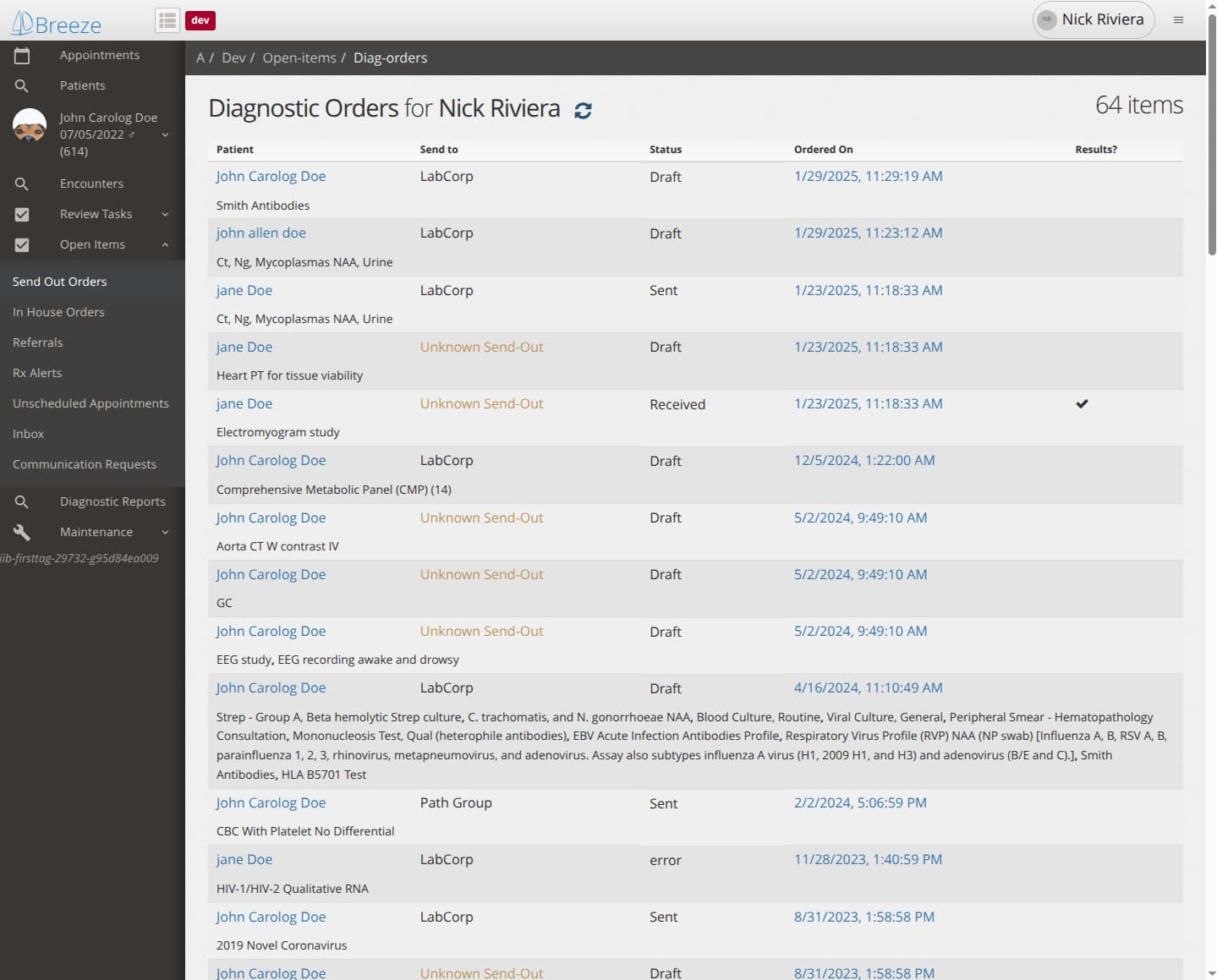
Lab orders sent electronically, in-house and send-out orders tracked from draft to result, with results landing in the chart.
Prescribing
Electronic prescribing, renewals and medication history through the national e-prescribing network.
Scheduling
Book, reschedule, check in and mark no-shows; a day's schedule copied to another day in one step.
Tasks and review
Results, messages and referrals routed as tasks with an owner, so nothing waits in an inbox unowned.
Referrals and claims
Referrals created with the reason attached; claims filed from the visit.
Patient portal
Patients see their record, appointments and messages, and can propose changes to their details for staff review.
Pediatrics
Growth charts and immunization records, reported to the state registry.
Phone and tablet
The whole record on a phone or a tablet, laid out for the screen, so rounds, home visits and on-call questions do not wait for a desk.
Fax and documents
Faxes and scanned documents come into the chart, matched to the patient and routed to the right person's queue; faxes go out from the chart too.
Hosted for you
Delivered as a service: Breeze runs the platform, each practice has its own separate space on it, and updates arrive with nothing to install.
The visit.
The note is where the day happens, so the note is where Breeze puts its effort. History, exam, assessment and plan sit where clinicians expect them; structured findings and free text live in the same section; and suggestions arrive inline as the note is written.
Findings are entered as items, not only as prose: a condition with its onset, a symptom with its qualifiers, a result with its value and unit. Each item is a real record in the chart, so it can be searched, counted, sent and reasoned about, and the note's narrative is generated from it. Several people can work in one note at once and see each other's changes as they happen. A section can be captured at a stated moment and attested, so what a clinician signed is exactly what the record showed when they signed it.
Suggested items appear as the note takes shape, from rules the practice can read and review; more can be asked for with one click. Accepting a suggestion makes it an ordinary item. Dictation into the section being written is built, with transcription on the server so it can be traced like any other entry; it reaches each practice as it moves to the new version of the clinical application.
Orders and results.
Laboratory orders go out electronically and results come back into the chart as reports, matched to the order they answer. In-house and send-out orders are tracked from draft to sent to received, across the whole practice or for one clinician, so an order that never came back is visible rather than forgotten. A result that lands creates a review task with an owner.
Imaging and other send-outs without an electronic connection are tracked the same way, with the destination recorded, so the follow-up is the same whether or not the receiving end is connected.
Prescribing.
Prescriptions are sent electronically through the national e-prescribing network, with renewal requests, cancellations and medication history handled in the same place. The medication list keeps itself consistent as prescriptions are replaced, stopped or renewed, and alerts that need a clinician's decision arrive as open items rather than as interruptions.
Scheduling.
Book, reschedule, check in, mark a no-show, release a slot. A day's schedule can be copied to another day in one step. Booking an appointment updates everything it touches together, so the schedule, the visit and the messages about it never disagree. Telehealth visits are scheduled like any other, with the video session signalled from the appointment.
Tasks and open items.
Anything that needs a person's attention becomes a task with an owner: a result to review, a message to answer, a referral to follow up, a prescription alert, an appointment that was never scheduled. Open items are grouped by kind, send-out orders, in-house orders, referrals, prescription alerts, unscheduled appointments, inbox, communication requests, so a clinician or a staff member sees their own queue and nothing waits unowned. Tasks move through start, complete, reassign, reject and reopen, with the rules about who may do what enforced by the system.
Referrals and claims.
A referral is created with the specialty and the reason attached, as a draft the clinician approves or directly as active, and followed until it completes. Claims are filed from the visit; a visit can be marked not to be billed. Insurance eligibility can be checked electronically against the payer before the visit.
Patients and families.
Demographics, related persons and guarantors are kept on the patient record, with links between family members. Patients use the portal to see their record, their appointments and their messages, and to propose changes to their details, which staff review before they are applied. Immunizations are recorded and reported to the state registry. Growth charts plot a child's measurements against the standard percentiles.
The whole record, on any screen.
Breeze EHR is built for the phone and the tablet as well as the desk. The layout adapts to the screen rather than shrinking it: the schedule, the chart, the note, tasks, messages and results review all work on a phone, and a tablet carries the full encounter. Rounds, home visits, a question from the on-call clinician and a quick check of a result between rooms happen where the clinician is. Patients reach the portal from their phones the same way.
Faxes and documents, routed, not filed.
Much of what arrives at a practice still arrives as paper or fax: outside records, consult notes, results from unconnected labs, forms. Breeze takes them in as documents, matches each to its patient, attaches it to the chart, and routes it to the right person's queue as a task, so a fax is reviewed and acted on rather than filed and forgotten. Faxes go out from the chart too, for referrals, orders and records requests, with the sent copy kept on the record. Every document is a record with its own history, like everything else in the chart.
Connections.
Breeze connects to the systems around a practice: laboratories for orders and results, pharmacies for prescriptions, hospitals for admission and discharge feeds, the immunization registry, payers for eligibility, fax lines and scanned documents, and text and voice messaging for reaching patients. Each connection follows the same shape on the platform underneath, which is what makes adding a new one a bounded piece of work. See Integration.